Solymar Payment Terms Extended
Give each B2B company location the payment terms you agreed, like Net 120, Net 30 EOM, or the 15th of next month, with an optional deposit. The due date sets itself at checkout. Built for Shopify Plus stores that sell B2B.
Requires Shopify Plus with B2B. Coming soon to the Shopify App Store.
Payment terms for every kind of account
Shopify B2B comes with ready-made net terms from Net 7 to Net 90. Some wholesale accounts are set up on something more specific: a distributor on Net 120, a buyer on Net 14, a buyer billed Net 30 from the end of the month, or an account that pays on the 15th of next month.
Solymar Payment Terms Extended builds on Shopify's B2B payment terms so you can give each company location the terms you agreed. When a buyer for that location checks out, the order gets the matching payment terms, due date, and deposit automatically. Payment terms are all it handles.
What the app does
Payment terms, set inside Shopify's own checkout. The rest of your store stays as it is.
Any number of days
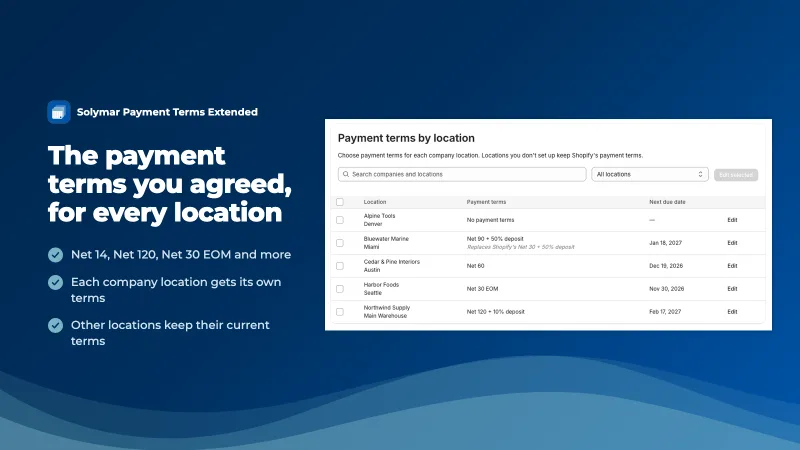
Net days of any length, so Net 14, Net 120, or Net 365 are set exactly. Each company location gets its own terms, even within the same company.
Month-end billing, with a cutoff
Net days EOM, end of month, end of next month, or a set day of next month. A cutoff day sends late-month orders into next month's cycle.
Deposits with every term type
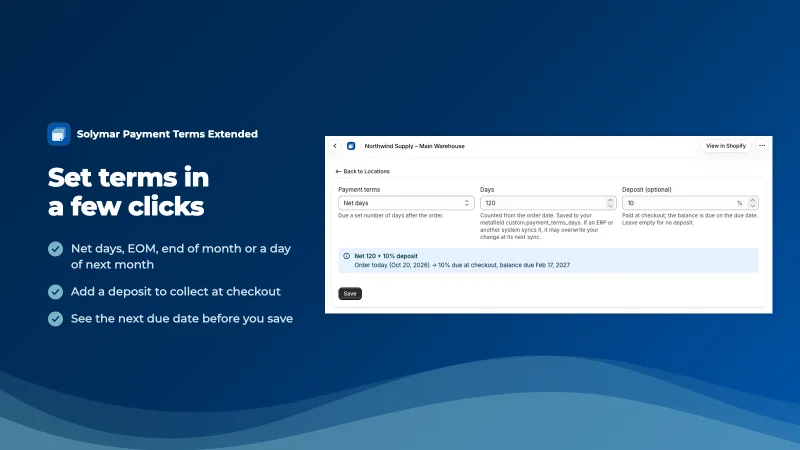
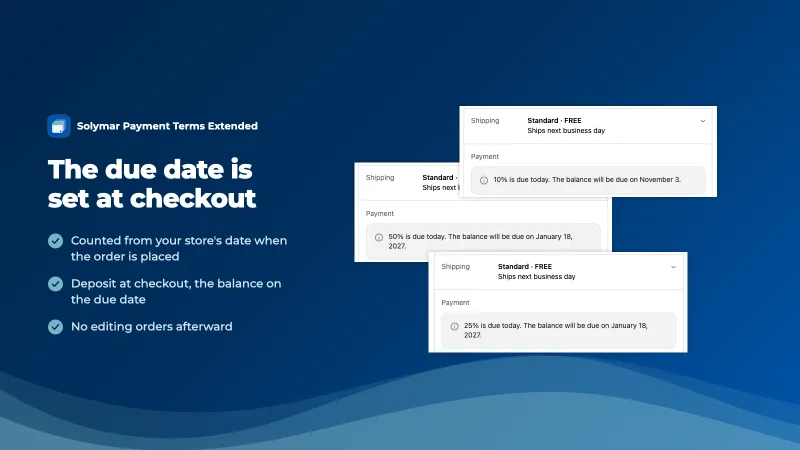
As with Shopify's own payment terms, any location's terms can include a deposit from 1 to 99%, collected at checkout, with the balance due on the due date.
Edit many locations at once
Search and filter every company location in one list, then edit one or select several and set their terms together, with a preview of the due date.
Works with your ERP's fields
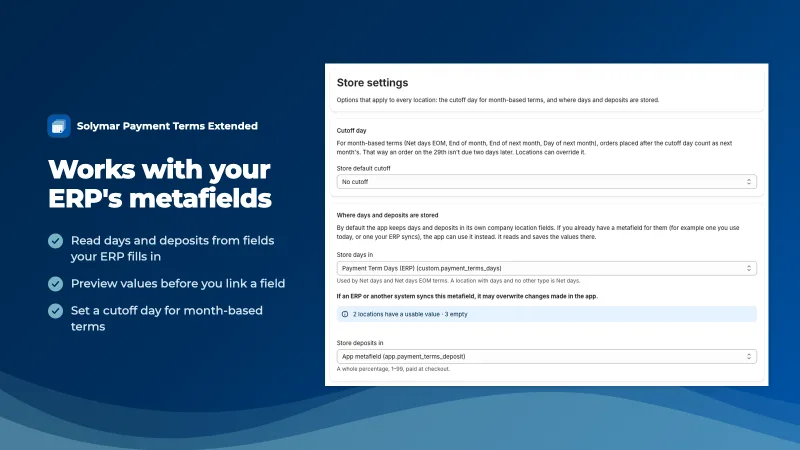
Keep days and deposits in the app's own fields, or link them to company location metafields your ERP already fills in. Switching never overwrites a value.
The rest of B2B stays as it is
Regular checkouts are untouched, and locations you haven't set up keep Shopify's terms and deposit. The app doesn't hide payment methods, edit your theme, or touch catalogs and price lists.
Who it's for
Shopify Plus stores that sell to businesses with Shopify's B2B features (companies and company locations), and that agree specific payment terms with their accounts, like Net 120 or Net 30 EOM. Plus is required because setting payment terms at checkout through an app is a Shopify Plus feature.
Wholesalers and distributors
Accounts on Net 120 or longer, written into the contract.
Accounts billed monthly
Net 30 EOM, or payment on a set day of next month, with a cutoff for late orders.
Stores with an ERP
Each customer's terms already live in the ERP and sync to Shopify metafields.
How it works
Setup takes a few minutes, and nothing changes at checkout until you give a location its terms.
-
Install and open
Setup adds the app's payment terms fields to your company locations. Nothing changes at checkout yet.
-
Set each location's terms
On the app's Locations page, pick a term type, days, and an optional deposit, one location at a time or several together.
-
Checkout does the rest
That location's next B2B order gets its terms, due date, and deposit, with no manual edits.
See it in Shopify
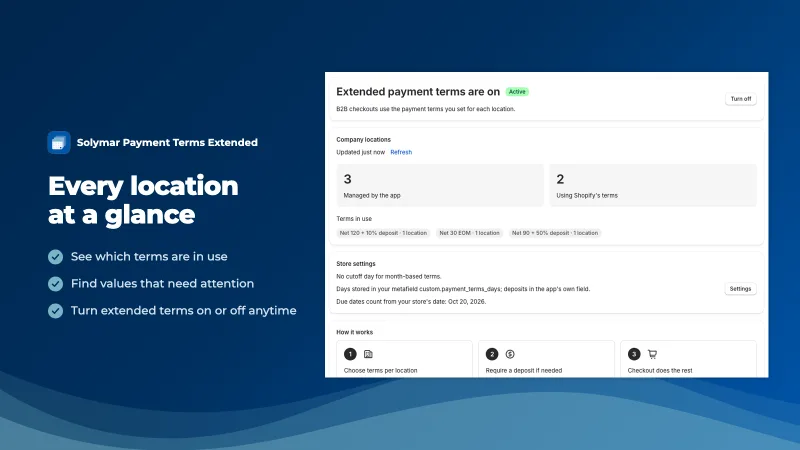
Set terms in Shopify admin, and buyers see them at checkout.
Pricing
One plan, Standard, with every feature. Billed by Shopify.
$39 per month
14-day free trial
- All five term types, deposits, and cutoff days
- Bulk editing and ERP metafield linking
- Charges appear on your regular Shopify bill
Coming soon to the Shopify App Store.
Questions merchants ask
Which Shopify plan do I need?
Shopify Plus, with B2B set up (companies and company locations). Setting payment terms at checkout through an app is a Shopify Plus feature, so the app is built for Plus stores. On any other plan, the app simply shows a message that it requires Shopify Plus.
Does it change checkout for my regular customers?
No. The app only acts on B2B checkouts, where the buyer is ordering for a company location. Regular customer checkouts are left alone. B2B locations you haven't set up in the app keep Shopify's payment terms and deposit, so you can start with one account and add the rest when you're ready.
Which payment terms can I set?
Five types, set per company location: Net days (any number, like Net 14, Net 120, or Net 365), Net days EOM (days after the end of the order's month), End of month, End of next month, and a set day of next month, like the 15th. Any of them can carry a deposit, and a location can also stay on Shopify's terms.
Can I ask for a deposit?
Yes. As with Shopify's own payment terms, any location's terms in the app can include a deposit from 1 to 99%, collected at checkout, with the balance due on the due date. When the app sets a location's terms, its deposit applies in place of one set in Shopify. The editor starts from the location's Shopify deposit, and the Home page points out any that would no longer apply.
Can I use fields my ERP already fills in?
Yes. In Settings, link the days and deposits to existing company location metafields, such as ones your ERP writes. The app shows sample values before you link. When you switch, it can copy values into locations that are empty, and it never overwrites. Linked values are read at checkout and updated when you edit terms in the app.
How do I get help if something isn't working?
Email apps@solymardigital.com. Support comes from Solymar Digital, the studio that built the app, so you hear back from someone who knows how it works. We answer every message, usually within one to two business days. Include your store's .myshopify.com address and the company location you're looking at.
Give every account the terms you agreed
Set each company location's terms once, and every B2B order after that gets the right due date and deposit.
or email apps@solymardigital.com